Message Hierarchy
Decide what needs to land first.
Glass could do a lot, but the film did not need to explain everything at once. We prioritised the shift from finding information to taking action and built the story around that single idea.
Product Marketing Video Case Study
AI workplace software, made clear.
We combined strategic scripting, UX animation and interface-led motion design to create a product marketing video that introduced Unily Glass clearly and supported the wider launch campaign.
The Launch Challenge
Unily was preparing to launch Glass, an AI powered feature designed to sit above the digital workplace and connect employees with the tools they use every day.
The challenge was not simply showing what Glass could do. The audience first needed to understand the new way of working the product made possible.
In a short launch film, that meant creating clarity fast. What should people understand first? What should the product prove? And which details could wait until later?
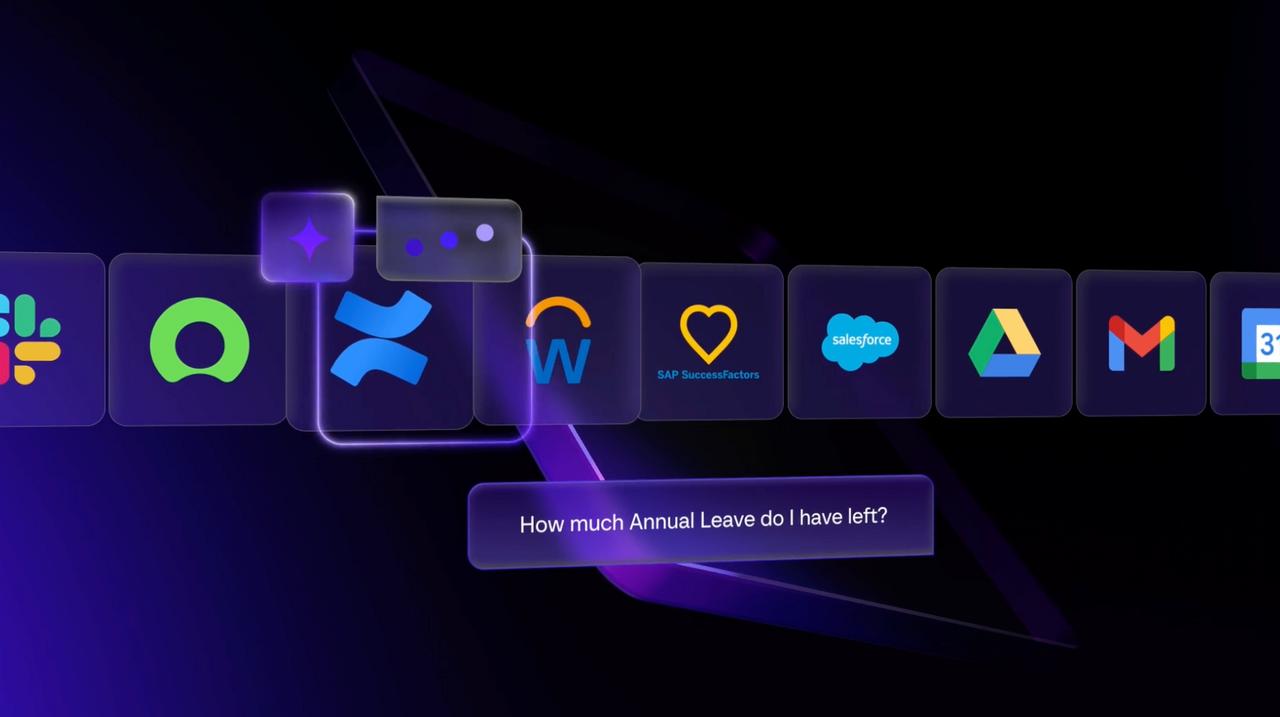
We shaped the story around the move from information to action, then used interface animation, motion and selected product interactions to make that change feel immediate and easy to understand.
The Strategic Decision
Sell the new way of working first. Let the product show how it becomes possible.
Product Launch Video
Unily needed to introduce a sophisticated new product in a way people could understand quickly.
We combined strategic scripting, product UI, UX animation, kinetic typography and subtle 3D to turn Unily Glass into a clear visual story rather than a feature walkthrough.
The film premiered at Unily's customer event before becoming part of the wider product launch campaign.
Explore product marketing videosOur Approach
A product launch film has a limited amount of time to make someone understand why a new product matters.
So we did not start by asking how much of Glass we could fit into the film. We started with what the audience needed to understand first.
That gave every creative decision a job. The script established the value, the interface provided proof and motion helped guide attention through the new product experience.
Message Hierarchy
Glass could do a lot, but the film did not need to explain everything at once. We prioritised the shift from finding information to taking action and built the story around that single idea.
Product Proof
Rather than turning the film into a walkthrough, we selected the product interactions that made the proposition tangible and used them at the moments where the audience needed proof.
Guided Attention
UX animation, kinetic typography and motion design helped control what the viewer noticed and when, making a sophisticated enterprise product feel easier to follow without oversimplifying it.
The Principle
The film did not need to explain every feature. It needed to make the value of Glass obvious enough that people wanted to know more.
Animation Storytelling
The Glass film was built entirely through animation, using Unily's Figma product designs as the starting point.
Rather than presenting static screens or recording a product walkthrough, we rebuilt the experience for film, deciding what should appear, move and change at every point in the story.
Dark mode interfaces, animated typography and carefully timed transitions helped turn a sophisticated product experience into something people could follow quickly.
Explore animation and motion
Figma to Film
Unily supplied the product designs in Figma. We used those files as the visual foundation, adapting the UI for motion while keeping the film recognisably Glass.
Product Motion
Interface movement was choreographed around the story. Elements appeared, responded and transitioned when the audience needed them, rather than simply reproducing how someone would click through the product.
Animated Type
Animated typography carried the key launch messages, creating pace and emphasis while allowing the product UI and proposition to feel like one connected visual story.
The Result
A product launch film that felt like the product itself, not a presentation about it.
Project FAQs
A few useful details about how the Unily Glass launch film was developed and delivered.
From timing and deliverables to how the interface was animated, these are the questions most relevant to teams planning a similar product launch.
The project was completed in approximately four weeks from script development through to final delivery.
That included messaging, scripting, visual development, interface animation, animated typography, motion design and final production.
No. Unily supplied the product designs in Figma and we adapted those files specifically for animation.
This gave us much more control over pacing, visual hierarchy and what the audience saw at each moment than a conventional screen recording.
Glass introduced a new way of interacting with workplace software, so the audience needed to understand the experience quickly.
Animation allowed us to guide attention, reveal interactions in sequence and combine product UI with messaging in one controlled visual story.
We delivered the main Unily Glass product launch film together with two shorter social edits for the wider launch campaign.
The project covered strategy, script development, creative direction, product animation, interface motion, animated typography and final delivery.
Planning a product launch? Explore our product marketing video work .
Product Marketing Videos
We help product marketing teams turn complex products into clear, distinctive films that make the value easier to understand and the launch easier to land.
From positioning and scripting through to product animation, interface motion and campaign assets, we build the story around what your audience needs to understand first.